
Ticket Helpdesk vs. OpenDesk Cloud
A helpdesk for your team.
Not another place to work.
OpenDesk brings email, live chat, a help center and AI into one product. But if your team mainly needs to organize support requests in Microsoft Teams, Ticket Helpdesk makes a more focused case: a straightforward ticket workflow and a smaller hosted subscription bill.
14-day trial for one support agent, then Free with up to 100 tickets per UTC calendar month. More tickets require a paid plan, even for one agent.
Ticket Helpdesk PRO · 5 agents
$75/ month, billed monthly5 paid agents at $15 each.
OpenDesk Cloud Pro · 5 paid users
$90/ month at the published Pro rate5 paid users at $18 per user/month.
Hosted subscriptions on both sides. USD base list prices before tax, with different feature sets. No annual-billing discount used in this example. Sources and assumptions.
Less scope. More focus.
Start with the support queue, not the whole support stack.
A small IT, HR or operations team often has a very practical problem: requests arrive, ownership is unclear, and follow-ups disappear into email threads. You need to know what came in, who owns it and what happens next.
Ticket Helpdesk centers the experience on that work. Start with manual ticket creation and sample tickets, or connect a Microsoft 365 mailbox during your trial or on a paid plan. Put requests in a shared queue, assign an owner, keep replies and internal notes together, and follow each ticket through to resolution.
A central Inbox for the conversation and its next step
Our central Inbox places folders, a searchable ticket list and the selected conversation side by side. Filter by queue, work through Unassigned, Mine, Needs reply and Waiting, and reply alongside the list. It is a focused inbox workspace, not just a list of ticket records. See the central Inbox.
Better information at intake
Queue-specific custom fields support text, dropdown, number, date and yes/no answers. Make questions requester-visible or internal; required requester fields do not block email intake. Shared forms accept file uploads, so screenshots, documents and logs stay with the request. Explore custom fields and form upload limits.
One conversation
Ticket details, public replies, attachments, internal notes and history stay with the request.
Clear ownership
Queues, priorities, manual assignment, round robin and load-based assignment keep the next action visible.
A focused paid plan
PRO includes unlimited tickets and queues, multiple mailboxes, time tracking, reports and 12-month audit history.
OpenDesk is also designed to be approachable. Its hosted quickstart requires no server installation, and you can skip mailbox setup and add channels later. We are not claiming it is difficult to use. Our advantage is a narrower workflow for teams that do not need to run a live-chat channel, publish a help center or introduce an AI teammate.
Those OpenDesk capabilities are optional, not mandatory setup steps. Simplicity here means product focus and a familiar workspace, not a measured promise that every organization will deploy our app faster. Mailbox permissions, queue access and your Microsoft Teams policies still need attention.
Keep support where your team already works.
Ticket Helpdesk gives agents a dedicated Microsoft Teams tab for ticket lists, conversations, queues and reports. Triage a request, assign it, reply and check progress without moving the support workflow into a separate application. Prefer a browser? You can use that too.
Outside Teams, install the standalone PWA and launch the same workspace from your home screen, taskbar or dock in its own window. It is an installable web app, not a claim of native desktop or iPhone app parity with OpenDesk. An internet connection is required; installation does not add offline ticket access. See installation options.
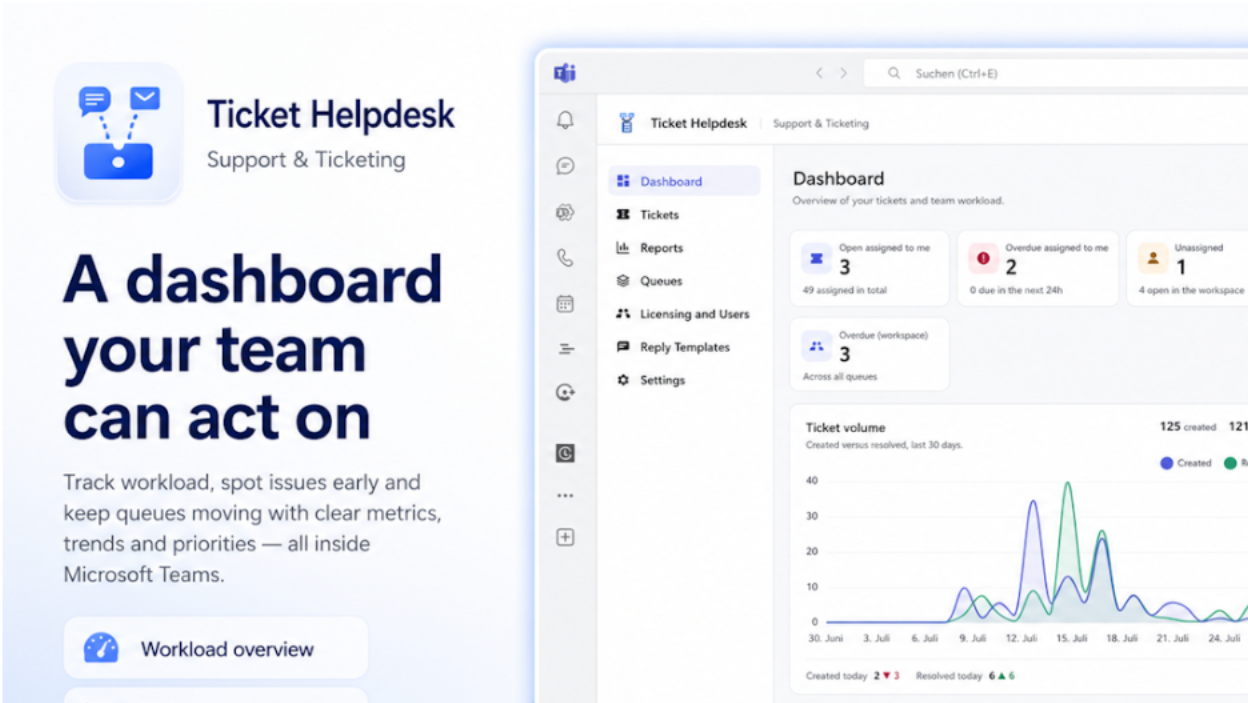
OpenDesk supports Microsoft sign-in and Microsoft 365 mailboxes. That is useful, but connecting a mailbox or signing in with Microsoft is not the same experience as managing the helpdesk in a Teams tab. OpenDesk’s published workflow centers on its own shared inbox, with web, desktop and iPhone apps. Our distinction is the purpose-built Teams workspace, not a claim that OpenDesk cannot work with Microsoft services or custom integrations.
Requesters do not need to be support agents. The customer ticket status page shows public replies, status history, requester-visible custom fields and whose turn it is. A private link lets customers reply or reopen a resolved or closed request with an explanation, without a new account. Treat those links like passwords: anyone with the link can access and reply to that ticket. This is lightweight ticket follow-up, not a searchable knowledge-base portal. See the customer status page.
Practical AI assistance, with the agent in control.
AI reply drafts suggest editable answers using the public conversation, approved templates and relevant solved tickets. AI summaries make handovers easier. AI reply-needed detection labels conversations Needs reply, Review needed or No reply needed, helping agents separate questions from acknowledgements.
Agents review drafts before sending and can correct reply-needed labels. Detection does not change ticket status or close tickets. Automatic summaries have a per-queue opt-out; automatic drafts require opt-in. This is agent assistance, not a claim that Ticket Helpdesk provides an autonomous counterpart to Ollie. Explore the included AI features; the pricing section below keeps the different AI packaging explicit.
Keep routine ticket work moving automatically.
Ticket Helpdesk now includes custom automation under Settings → Automations. Workspace administrators use a visual WHEN → IF → THEN builder to respond to ticket events, unanswered replies, inactivity, ticket age or SLA deadlines. Assign an agent, change status or priority, add an internal note, send a template email or notify agents. Safe preview and execution history make the rules understandable without writing code.
Business-hours-aware SLAs are available in Ticket Helpdesk too. Administrators can enable a workspace timezone and Monday–Friday working hours under Settings → General → SLA business hours. First-response and resolution targets then skip nights and weekends and adjust for daylight saving, with one resolution business day equal to one configured workday. Without this opt-in setting, first response uses elapsed hours and resolution skips weekends only. Holidays and multiple calendars are not supported, and existing deadlines remain unchanged. See how our business-hours SLAs work.
Trial, PRO and Business include 10 active custom rules per workspace; Enterprise limits are configurable. Free supports disabled drafts and preview, not active custom rules. Channel entitlements still apply, and existing queue automations remain independent. Explore ticket automation. These rules are not an autonomous AI agent, live-chat channel or general integration platform.
Compare hosted with hosted
Five agents. $15 less every month.
OpenDesk’s open-source license is free, but its hosted team plan is a subscription. OpenDesk Cloud Pro lists $18 per user/month. Owners, admins and agents count as paid users; read-only viewers are free. Its Free hosted workspace is limited to one mailbox and one team member.
Ticket Helpdesk PRO is a paid subscription that charges for every agent. It costs $15 per agent/month, billed monthly, with a minimum of one paid seat even for a solo agent. One agent is free only within the Free plan limits, including up to 100 tickets per UTC calendar month; more tickets require a paid plan. Requesters are always free. For this comparison, every person in the table actively handles support: every working agent requires a paid license on either platform.
| Active support agents | Ticket Helpdesk PRO | OpenDesk Cloud Pro | Monthly saving |
|---|---|---|---|
| 2 agents | $30/month | $36/month | $6/month |
| 5 agents | $75/month | $90/month | $15/month |
| 10 agents | $150/month | $180/month | $30/month |
17% lower base subscription cost for five agents. $75 instead of $90 per month leaves $180 in your budget over twelve months at unchanged monthly rates.
Prefer an annual commitment? Our PRO base rate is $135 per agent/year, so five agents cost $675 paid annually. That is a separate billing choice, not the rate used to calculate the monthly savings above.
What the prices include differs. OpenDesk Pro includes $10 of AI usage per paid user/month, pooled across the workspace, plus its broader feature set. A five-user team gets $50 of pooled monthly AI allowance; we do not subtract it from the subscription or present our plans as AI-equivalent. Additional OpenDesk AI usage can require top-ups; bringing your own key shifts model costs to your provider, and some triage still uses the OpenDesk balance. Ticket Helpdesk includes AI reply drafts, AI summaries and auto-close in every plan, with no separate AI package or lifetime draft limit. Free reply generation pauses at 100 tickets per UTC calendar month. Drafts need human review; auto-close is timer-based, not an autonomous AI agent.
These are base subscription costs, not total operating costs or a feature-parity claim. Taxes, localized checkout prices, discounts, optional AI usage, Microsoft 365 subscriptions and migration work are excluded. The Ticket Helpdesk values use this website’s configured USD base prices, not a localized checkout quote. Check our current pricing and OpenDesk’s current pricing before buying.
What about OpenDesk’s free options?
OpenDesk Cloud is genuinely free for one member and one mailbox, with every feature and $0.50 of monthly AI usage. If you are a solo operator and those limits fit, it is a strong option. We are not claiming Ticket Helpdesk is cheaper than a free hosted workspace.
OpenDesk self-hosted is free and unlimited under Apache-2.0, using the same code as Cloud. Its installer simplifies deployment, but you still provide the server and operate the installation, backups and upgrades; AI uses your own key or a local model. That is a different buying decision from a managed subscription. The hosted table above does not assign a made-up license price or infrastructure cost to self-hosted OpenDesk.
Ticket Helpdesk starts with a 14-day trial for one agent, followed by a limited Free plan: one agent, one queue, one mailbox and up to 100 tickets per UTC calendar month, with 30-day audit history. More tickets require a paid plan, even for one agent. The allowance resets on the 1st at 00:00 UTC. Free public replies carry our branding; automated email intake and email notifications require an active trial or paid plan. At the monthly ticket limit, creating, editing and replying pause until reset or upgrade; incoming emails are still collected.
On our Free plan, tickets and their comments are permanently deleted six calendar months after ticket creation, including open tickets and newer replies. Upgrade before expiry if you need to keep them. Activating PRO requires at least one paid seat, even for a solo operator: the minimum is $15/month or $135/year, for one agent seat. Read the full plan conditions.
Choose the helpdesk for the work you actually have.
Choose Ticket Helpdesk when…
- You want a central Inbox in Teams, a browser or an installed standalone app.
- Your priority is email and form intake, clear ownership and reliable follow-up.
- You want custom fields, form uploads, included AI assistance and customer status pages without adopting a broader customer-support stack.
- You want hosted support for multiple agents at the lower base subscription costs shown above.
Choose OpenDesk when…
You need website live chat, a public knowledge base, Ollie’s AI capabilities, CSAT, developer integrations or native desktop and iPhone apps. Its open-source code, self-hosting option and feature-complete one-member Free cloud plan are real strengths.
OpenDesk also documents a public API. Both products support business-hours-aware SLA targets, but that does not imply equivalent calendar, AI or integration coverage. Check the specific capabilities you need.
For a Teams-based support team, our case is straightforward: keep the workflow familiar, give every request an owner, and spend less on the hosted subscription. You do not need to buy a broader feature set just because it is available.
Less switching. A smaller bill. More focus on helping.
Try a real support request in Ticket Helpdesk. Capture it, assign it, reply and follow it through — in Teams or your browser.
14-day trial for one agent, then the limited Free plan described above. See current plans.